
What is Internal Linking and External Linking in SEO? (Complete Guide)
Author: Yuvraj Yadav
When people start learning SEO, they usually focus on keywords, content writing, or backlinks. But one of the most overlooked parts of SEO is linking. A proper linking strategy helps search engines understand your website and also makes it easier for visitors to find useful information.
There are two main types of links used in SEO:
- Internal Linking
- External Linking
Both are important, but they serve different purposes. In this guide, I’ll explain everything in simple language with real examples.
What is Internal Linking?
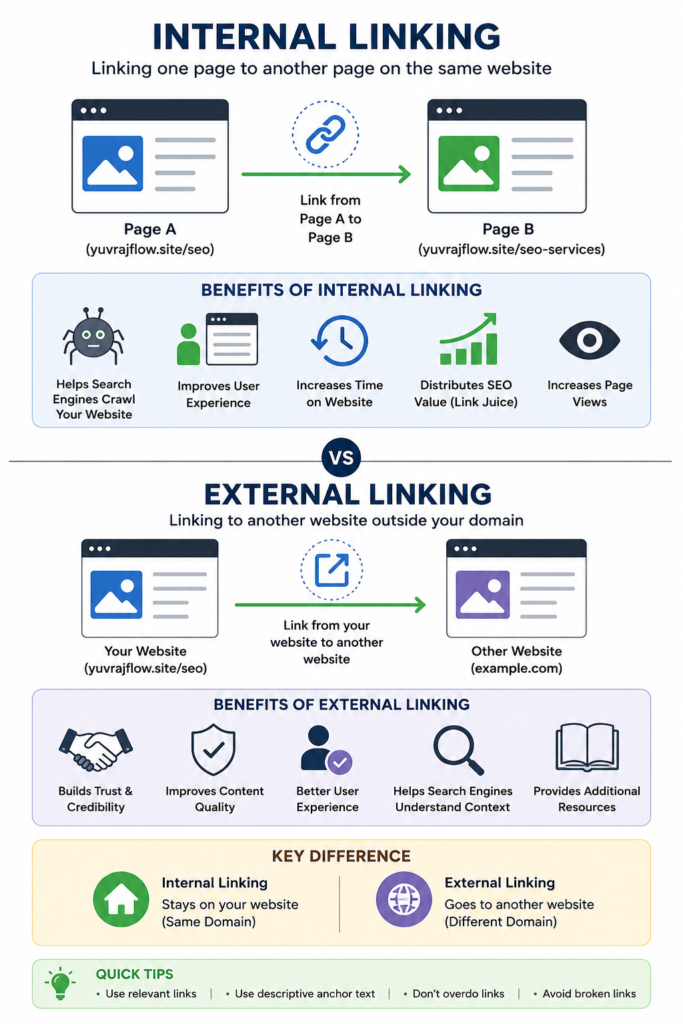
Internal linking means connecting one page of your website to another page on the same website.
In simple words, if you have written one blog and it contains a link to another blog or service page on your own website, that is called an internal link.
Example
Suppose your website is:
You have these pages:
- SEO Services
- Website Development
- AI Chatbot Development
- Meta Ads Services
- Contact Us
Now imagine you are writing a blog about SEO.
Inside the blog, you write:
If you want professional SEO services for your business, you can check our SEO Services page.
This is an internal link because both pages belong to the same website.
Why is Internal Linking Important?
Many website owners write blogs but never connect them with other pages. This is a big mistake.
Internal links help both users and Google.
1. Helps Google Discover Pages
Google crawls websites by following links.
If one page links to another page, Google can easily find and index it.
Without internal links, some pages may never get enough attention from search engines.
2. Improves User Experience
Imagine someone reads your article about SEO.
Now they also want to learn:
- Keyword Research
- Backlink Building
- Technical SEO
Instead of searching again, they can simply click your internal links.
This keeps visitors on your website longer.
3. Reduces Bounce Rate
When visitors open another page after reading the first one, they spend more time on your website.
This creates a better browsing experience.
4. Passes SEO Value
Some pages naturally receive more traffic and authority.
By linking those pages to newer pages, you help distribute that authority throughout your website.
5. Increases Page Views
One visitor can explore multiple pages instead of leaving after reading just one.
This increases overall engagement.
Best Practices for Internal Linking
Here are some simple rules I personally recommend.
Use Relevant Links
Only link pages that are related.
For example:
SEO Blog
↓
Keyword Research Guide
↓
On-Page SEO Guide
↓
Technical SEO Guide
Everything is connected naturally.
Use Descriptive Anchor Text
Anchor text is the clickable text.
Good example:
Learn our complete WordPress Website Development Guide
Bad example:
Click Here
Good anchor text tells users and Google what the linked page is about.
Don’t Overuse Links
Adding 50 internal links inside a short article doesn’t help.
Use links naturally wherever they add value.
Link to Important Pages
Always connect blogs to your main service pages.
For example:
- SEO Services
- Website Development
- AI Chatbot
- Meta Ads
- Contact Page
This helps both users and search engines.
What is External Linking?
External linking means linking your website to another website.
These links point visitors outside your domain.
Example
Suppose you are writing about Google’s SEO guidelines.
You include a link to Google’s official documentation.
That is an external link.
Another example:
While explaining WordPress, you may link to the official WordPress website.
These are external links because they point to different domains.
Why is External Linking Important?
Many beginners think linking to another website will reduce their SEO.
That is not true when you link to trusted and relevant sources.
1. Builds Trust
When you support your information with reliable sources, readers are more likely to trust your content.
2. Improves Content Quality
External references make your article more useful.
Visitors can learn more if they want additional information.
3. Helps Google Understand Context
When your article links to relevant authority websites, it gives search engines more context about your topic.
4. Provides Better User Experience
Sometimes your readers need official information.
Providing a reliable external source saves them time.
Best Practices for External Linking
Link Only to Trusted Websites
Examples include:
- Microsoft
- WordPress
- HubSpot
- Moz
- Ahrefs
- Semrush
Avoid linking to spammy or low-quality websites.
Keep Links Relevant
If your article is about SEO, don’t randomly link to a cooking website.
Everything should match the topic.
Check Broken Links
If the external website removes its page, your visitors will see a 404 error.
Review your links regularly to make sure they still work.
Don’t Add Too Many External Links
Use them only where they genuinely improve the article.
Internal Linking vs External Linking
| Internal Linking | External Linking |
|---|---|
| Links to another page on your own website | Links to a different website |
| Improves website navigation | Adds credibility and references |
| Helps Google crawl your website | Helps users access trusted information |
| Keeps visitors on your site | Sends users to helpful external resources |
| Passes authority between your own pages | Connects your content with authoritative sources |
Real Example
Suppose your website offers digital marketing services.
You publish a blog:
What is SEO?
Inside the article, you add internal links to:
- SEO Services
- Website Development
- Meta Ads Services
- AI Chatbot Development
- Contact Us
You also add external links to trusted resources such as Google’s Search documentation or the WordPress website to support specific points.
This creates a balanced linking strategy that helps both readers and search engines.
Common Mistakes to Avoid
Many beginners unknowingly make these mistakes:
- Adding too many links in one paragraph.
- Using “Click Here” as anchor text everywhere.
- Linking to unrelated pages.
- Never updating old articles with new internal links.
- Linking to low-quality or spam websites.
- Ignoring broken external links.
Avoiding these mistakes can improve both user experience and SEO performance.
Final Thoughts
Internal linking and external linking are both essential parts of a successful SEO strategy.
Internal links help visitors discover more content on your website, improve navigation, and make it easier for search engines to crawl and understand your pages. External links, when used carefully, add credibility by connecting your content with trusted sources and giving readers access to additional information.
Instead of treating linking as an afterthought, make it a habit whenever you publish a new page or blog. Review older content, add relevant internal links, and include external references only when they genuinely strengthen your article. Over time, this simple practice can improve your website’s structure, user experience, and long-term search engine performance.
If you consistently create valuable content and support it with a smart linking strategy, you’ll build a stronger foundation for better rankings and a more engaging website.
About the Author
Yuvraj Yadav is the founder of Yuvraj Flow, where he helps businesses grow through SEO, WordPress website development, AI chatbot solutions, performance marketing, and digital automation. He enjoys simplifying complex digital marketing concepts into practical guides that anyone can understand and apply.